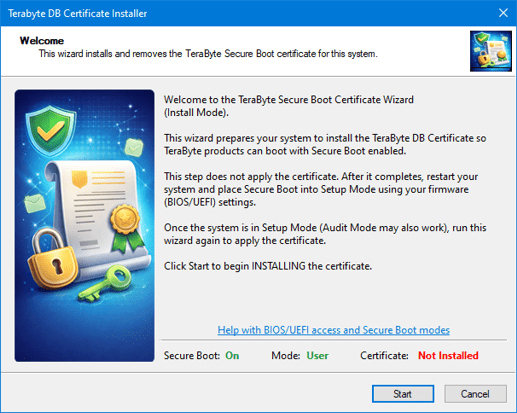
The TeraByte DB Certificate Installer provides an easy-to-use wizard for installing the TeraByte Secure Boot certificate into your computer’s UEFI Secure Boot database.
Installing this certificate is completely optional. It is only needed if you want to use TeraByte-signed startup boot files with Secure Boot enabled. If you do not need that option, you do not need to install the certificate.
When Secure Boot is enabled, the boot files used to start an operating system must be digitally signed and trusted by the computer’s UEFI firmware. Trusted certificates are stored in the firmware’s allowed signature database, commonly called db.
Updating Secure Boot certificates while Secure Boot is enabled normally requires the update to be authorized by a certificate in the firmware’s Key Exchange Key database, or KEK. These keys are usually configured by the PC manufacturer.
If the required authorization key is not already present, the system must be placed into Secure Boot Setup Mode before the allowed certificate database can be changed. This typically requires temporarily disabling or clearing Secure Boot keys in the firmware setup utility.
The TeraByte DB Certificate Installer does not bypass these UEFI Secure Boot requirements. It simply guides the user through the process and makes the certificate installation much easier.
Once the TeraByte certificate is installed, you will have an additional startup option: using TeraByte-signed boot files. This does not replace the standard Secure Boot choices; it simply adds another trusted option that you can choose when needed.
We use cookies to provide the best online experience. Some cookies are necessary for our website and services to function properly, while others are optional and help personalize your experience or provide analytical data. You can choose to accept all cookies, deny all optional cookies, or customize your preferences.
Functional
Always active
The technical storage or access is strictly necessary for the legitimate purpose of enabling the use of a specific service explicitly requested by the subscriber or user, or for the sole purpose of carrying out the transmission of a communication over an electronic communications network.
Preferences
The technical storage or access is necessary for the legitimate purpose of storing preferences that are not requested by the subscriber or user.
Statistics
The technical storage or access that is used exclusively for statistical purposes.The technical storage or access that is used exclusively for anonymous statistical purposes. Without a subpoena, voluntary compliance on the part of your Internet Service Provider, or additional records from a third party, information stored or retrieved for this purpose alone cannot usually be used to identify you.
Marketing
The technical storage or access is required to create user profiles to send advertising, or to track the user on a website or across several websites for similar marketing purposes.
We use cookies on this website to provide the best online experience. Please refer to our Privacy Policy for more details.
Functional
Always active
The technical storage or access is strictly necessary for the legitimate purpose of enabling the use of a specific service explicitly requested by the subscriber or user, or for the sole purpose of carrying out the transmission of a communication over an electronic communications network.
Preferences
The technical storage or access is necessary for the legitimate purpose of storing preferences that are not requested by the subscriber or user.
Statistics
The technical storage or access that is used exclusively for statistical purposes.The technical storage or access that is used exclusively for anonymous statistical purposes. Without a subpoena, voluntary compliance on the part of your Internet Service Provider, or additional records from a third party, information stored or retrieved for this purpose alone cannot usually be used to identify you.
Marketing
The technical storage or access is required to create user profiles to send advertising, or to track the user on a website or across several websites for similar marketing purposes.