Page 1 of 1
Restore a partition removed after restoring with IFL
Posted: Fri Sep 26, 2025 12:55 am
by Bertk
Hello,
I just purchased the TeraByte Bundle 2 and restored a Win10 partition to a SSD using IFL. The drive had two partitions. One empty which I intended to restore Win10 to. And one with data on it. In doing so the restore used both partitions rather than just the one empty one I intended to use. I have no backup of the partition which contained the data. I do have PartWork for Windows installed.
Is there any way of returning the SSD drive back to having both partitions?
Regards, Bert
Re: Restore a partition removed after restoring with IFL
Posted: Fri Sep 26, 2025 2:43 am
by TeraByte Support
you could try deleting the partition (without any clear or wipe options) then use undelete. If it brings back the same one, try resizing it smaller than the original then undelete the free space, if the new partition starts over the old (at the beginning) then that data is most likely overwritten.
The only way it would delete another partition is if you restore entire drive instead of just a single partition. You get a warning of what will be overwritten.
Re: Restore a partition removed after restoring with IFL
Posted: Fri Sep 26, 2025 3:26 am
by Bertk
When I restored Win10 partition it created the four partitions across the drive.
System: 260mb
MS reserved : 16mb
Win10: 3.64 TiB NTFS
WinRE: 1011mb
Considering the size of the Win10 partition, would it be a good idea to just delete it then try undelete?
Or as you suggest deleting them all and try undelete?
Oh, would it be best to use PartWork or the command prompt to delete the partitions?
I have not accessed this partition.
Bert
Re: Restore a partition removed after restoring with IFL
Posted: Fri Sep 26, 2025 3:50 am
by Bertk
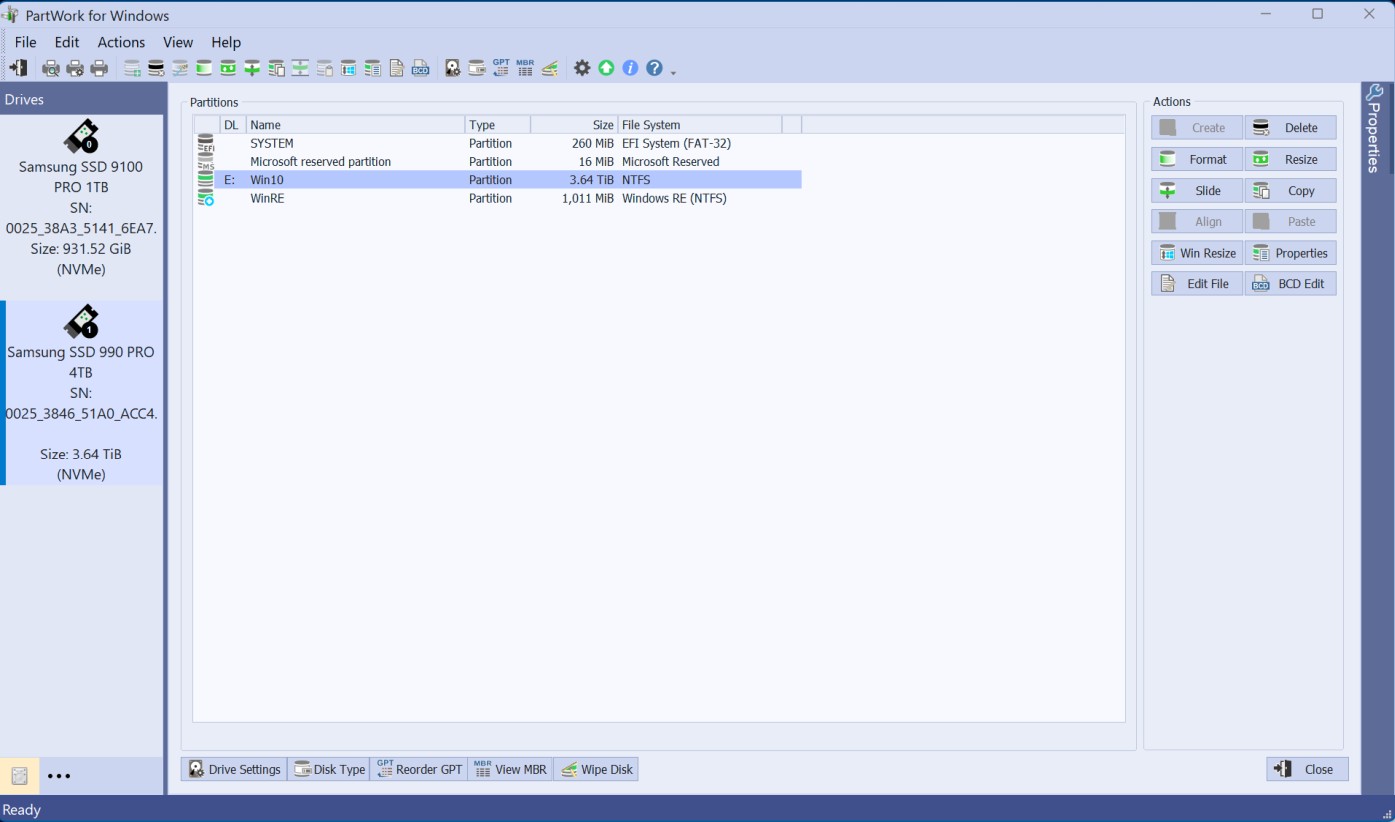
- Pic.jpg (98.46 KiB) Viewed 35986 times
Re: Restore a partition removed after restoring with IFL
Posted: Fri Sep 26, 2025 5:30 am
by TeraByte Support
That's a full drive restore (which would have listed all partitions to be over written) it's doubtful things can be recovered without corruption. What was the partition layout prior? How big of empty one followed by data? The only thing you can try with undelete is to delete each one and use the "clear bs" option, then undelete the full free space, if you're lucky the partition was somewhere out far in to that ntfs partition where no data was restored. Even if you get the partition back, it doesn't mean some of the files won't contain other data that was restored. Other than that you'd need to try a data recovery tool that looks for files in the unused areas.
Re: Restore a partition removed after restoring with IFL
Posted: Fri Sep 26, 2025 1:21 pm
by Bertk
The prior layout was two partitions E: and F: about the same size. I moved the data in E: to F: where the important data was stored.
E: was empty and where I intended to install Win10.
I am not familiar with the "Clear bs" option? Is that in ParkWork?
Do you have a recommendation for a data recovery tool?
I know this was my doing and the chances for recovering the files are slim.

And I appreciate you're help!

Re: Restore a partition removed after restoring with IFL
Posted: Fri Sep 26, 2025 6:22 pm
by TeraByte Support
yes, when you delete a partition it's an option on the dialog. Well if you had 50/50 there may be a chance depending on how much data is in the restored partition.
Re: Restore a partition removed after restoring with IFL
Posted: Fri Sep 26, 2025 11:23 pm
by Bertk
TeraByte Support wrote: Fri Sep 26, 2025 6:22 pm
yes, when you delete a partition it's an option on the dialog. Well if you had 50/50 there may be a chance depending on how much data is in the restored partition.
I followed you're instruction and deleted all four partition using the "Clear bs" option. Then ran undelete on the free space. It took a little while then displayed "Completed 1 Recovered". Once I clicked Close on the Undelete Completed box as shown in the attachment the "Backup (F)" partition that was deleted in the restore process or Win10 was the partition where I had data stored appeared and window explorer opened and there where all my 592GBs of files!!!

A folder with 134GBs 38k of photos was intact. I clicked an a bunch of them and no corruption was found. Thank you very much for all the help and great support and products you create!
Something that may have caused both partitions to be removed was that I selecting the "Scale to Fit" option in the restore process?
Regards, Bert
Re: Restore a partition removed after restoring with IFL
Posted: Sat Sep 27, 2025 1:00 am
by TeraByte Support
You restored the "entire drive" instead of the just a single partition.