Page 1 of 2
Bug Report IfW v3.61
Posted: Wed Jul 26, 2023 1:44 pm
by brahman
Hello,
I would like to report possible bugs:
1.) After going a few times back and forth with the previous and next buttons, the drive partition screen starts looking squished:

- Screenshot - 26.7.2023 , 15_37_37.png (14.57 KiB) Viewed 6703 times
My graphics card is a 2048MB ATI AMD Radeon Vega 8 Graphics (ATI) and CPU is AMD Ryzen 5 3550H on Win 11 21H2.
2.) When I copy a partition - in this case an encrypted VeraCrypt partition - IfW shows me twice the amount of data remaining than what is on the source drive.
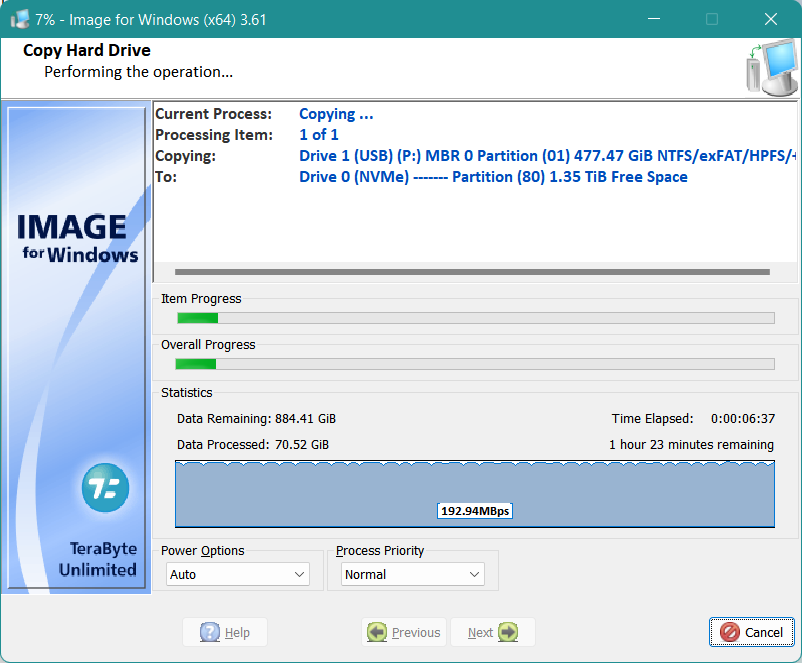
- Screenshot - 26.7.2023 , 1_12_32.png (64.32 KiB) Viewed 6703 times
Re: Bug Report IfW v3.61
Posted: Wed Jul 26, 2023 3:09 pm
by TeraByte Support
if you have validate enable it will double since it has to do double the amount of data (copy then validate).
Re: Bug Report IfW v3.61
Posted: Wed Jul 26, 2023 6:50 pm
by brahman
Validate was not enabled
Re: Bug Report IfW v3.61
Posted: Wed Jul 26, 2023 8:54 pm
by TeraByte Support
For *copy* it is counting both the read/write. Validate will double that, but with backup it may adjust based what is actually backed up (diff/incremental).
Re: Bug Report IfW v3.61
Posted: Thu Jul 27, 2023 1:50 pm
by brahman
Ok thank you, that explains it.
Can you look into the graphics problems? Sometimes I go back and forth a lot and it becomes increasingly worse each time I switch screens (the letters get more cut off).
It doesn't happen the first few times if you try to confirm the problem.
Re: Bug Report IfW v3.61
Posted: Thu Jul 27, 2023 8:58 pm
by TeraByte Support
what is you display settings dpi (100%, 125%, etc..) ? Did you customize any of those values that controls colors or spacing? also back and forth from where to where?
Re: Bug Report IfW v3.61
Posted: Fri Jul 28, 2023 4:41 am
by brahman
Scale is set to 175%
Back and forth from setting before start - back to source and target and then switch between source and target or even go back to settings at the beginning.
Re: Bug Report IfW v3.61
Posted: Sat Jul 29, 2023 3:43 am
by TeraByte Support
I can't reproduce it on Win10 x64.
Re: Bug Report IfW v3.61
Posted: Sat Jul 29, 2023 5:50 am
by OldNavyGuy
brahman wrote: Fri Jul 28, 2023 4:41 am
Scale is set to 175%
Back and forth from setting before start - back to source and target and then switch between source and target or even go back to settings at the beginning.
Try right-clicking on the executable, select Compatibility, and click on Change high DPI settings.
Select Program DPI and try each setting in the drop down.
Select High DPI scaling override and try each setting in the drop down.
It's your custom scaling, rather than an IFW issue.
As an aside, you also might consider upgrading to Windows 11 22H2...21H2 is EOL in 3 months.
Microsoft has already started force-upgrading those systems on 21H2 to 22H2.
Re: Bug Report IfW v3.61
Posted: Tue Aug 29, 2023 8:42 pm
by brahman
TeraByte Support wrote: Sat Jul 29, 2023 3:43 am
I can't reproduce it on Win10 x64.
Steps to reproduce it (Win 11 21H2):
Open imagew64.exe
Click on "Copy" > Next
Check a disk or partition
Click Next > Previous
Repeat Click Next > Previous 5 times
By then I always see the compressed disk/partition in lines
OldNavyGuy wrote: Sat Jul 29, 2023 5:50 am
Try right-clicking on the executable, select Compatibility, and click on Change high DPI settings.
Select Program DPI and try each setting in the drop down.
Select High DPI scaling override and try each setting in the drop down.
It's your custom scaling, rather than an IFW issue.
As an aside, you also might consider upgrading to Windows 11 22H2...21H2 is EOL in 3 months.
Microsoft has already started force-upgrading those systems on 21H2 to 22H2.
I tried all combination of DPI you suggested and nothing changed this effect.
I cannot upgrade to 22H2 because Windows Update doesn't suggest the update (and I tried numerous tricks). Also manual download and in-place upgrade is stopped with an error code. So I am actually wishing for a working forced upgrade.